SilverBullet 2.11: Enter the Collaborative Monospace
There’s a lot that happened since we last spoke, you and I.
I have much to tell you.
However, I appreciate you’re a busy person and you may not be patient enough to read this entire 5k word journey, so here’s the rub about the 2.11 release (spoilers ahead):
- UX refresh (monospace fonts, more UX consistency in general, dockable views, file tree)
- Multi-space and multi-user upgrades (SSO, permissions)
- Collaboration features (revisions, quasi real-time updates, comments,
@mentions) - Obsidian-compatible link resolving
- Tons of tweaks, fixes and optimizations
- Video of me demoing the new collaboration features
- Building towards 3.0
Did that sufficiently peak your interest? Then I invite you to read this entire post. Until the very end.
And go install/upgrade to the release while you read:
- SilverBullet+ 2.11 (desktop)
- SilverBullet.md 2.11 (server)
Remember what I said about a month ago?
I’m (trying) to put the brakes on introducing huge, rampant changes to SilverBullet fundamentals at this point. I think what’s there is pretty solid and what it needs most now is tuning and polish. Introducing multi-space and multi-account support I categorize as polish. It changes nothing in the main editor experience, it’s just polish around the edges.
I’ll just say — technically I adhered to this for the 2.11 release, but only if you define “polish” in a rather liberal manner.
So where to start? Let’s start with the most in-your-face part: UX.
So here’s what happened — I got baited in the youtube comments by somebody asking — and I’ll paraphrase — “yo dude, why a monospace font, people care about first impressions ya’ no!”
Indeed, first impressions matter. However, sorry dear youtube commenter, monospace fonts in SilverBullet are life (if only because they’re a hard requirement to make the lay-out system work at all).
To be honest, the mix of different fonts and styles had been bothering me for some time, but I couldn’t quite figure out what to do with it. Your comment, dear youtube frequenter, has pushed me to finally come up with a more coherent look and feel, and you’re not going to like it. But after living in this for some time, I really like it myself. And let’s not forget, even though there’s likely thousands of you users out there — ultimately, I created SilverBullet for myself. So there’s that. Sad news for those who aren’t fans: the new UX could be summarized as super monospace. Which is ironic, because recently SilverBullet as a whole went multi-space.
But honestly, if monospace fonts had really bothered you, you were already in for a rough ride. It’s time to give in.
What does this look like? This post itself (especially on the web) should already give you a feel. And here’s the redesigned dashboard (formerly known as “Space Manager”) that greets you on your server:
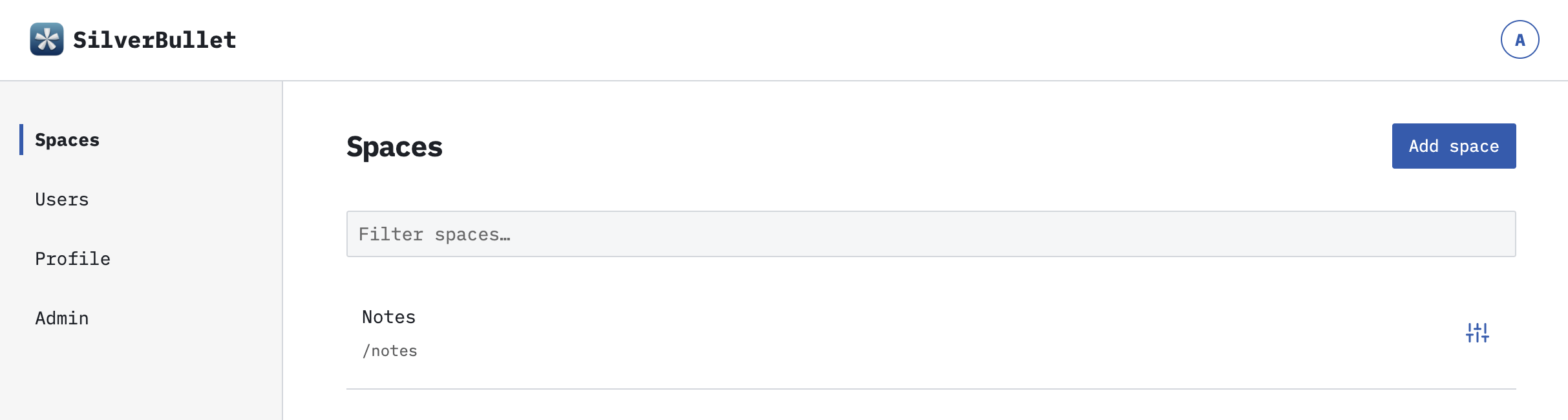 The SilverBullet+ dashboard looks and feels similar:
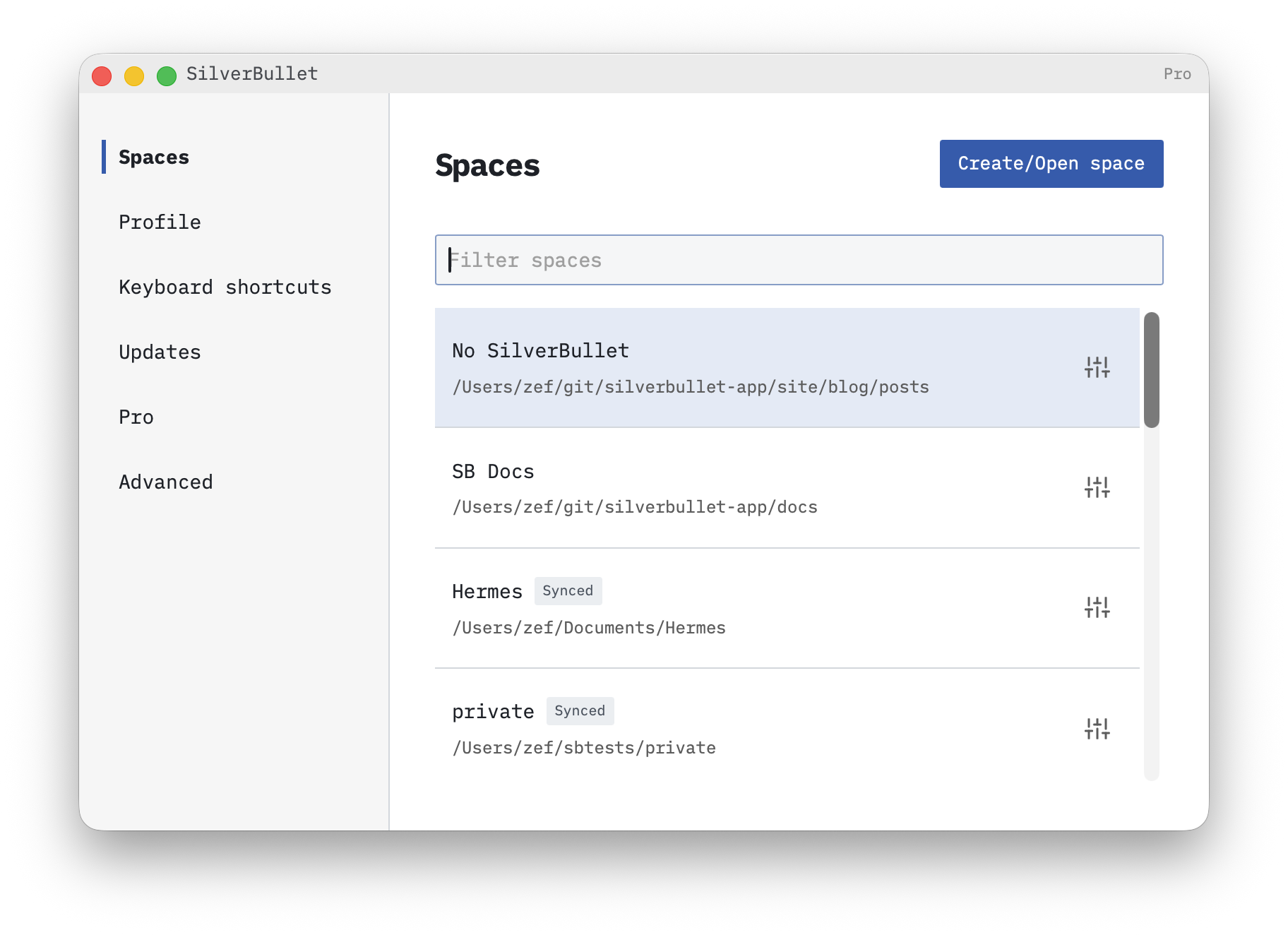
More screenshots later, as we walk through some other new features.
With that out of the way, let’s move on to more functional UX enhancements.
Views
SilverBullet has always prided itself in being minimalistic in its UI. Partially this was by design. Partially it was an excuse not to have to build table-stake features that other editors offer, like — I don’t know — a file tree, for instance.
However, as I’m preparing SilverBullet to be slightly more interesting to the mainstream, it was clear this needed to change. For the list of table stake features, in this release I decided to tackle the file tree. Absolutely, there’s Mr.Red’s excellent Document Explorer that many people are using. But it was clear, we needed a “native” solution for this at some point. We can’t deny that some people like file trees. Of course, I reached out to Mr.Red to make sure he didn’t mind getting sherlocked. We seem to be good.
So here you go, we have a native file tree now (bound to Cmd-o/Ctrl-o), indeed with monospace fonts:
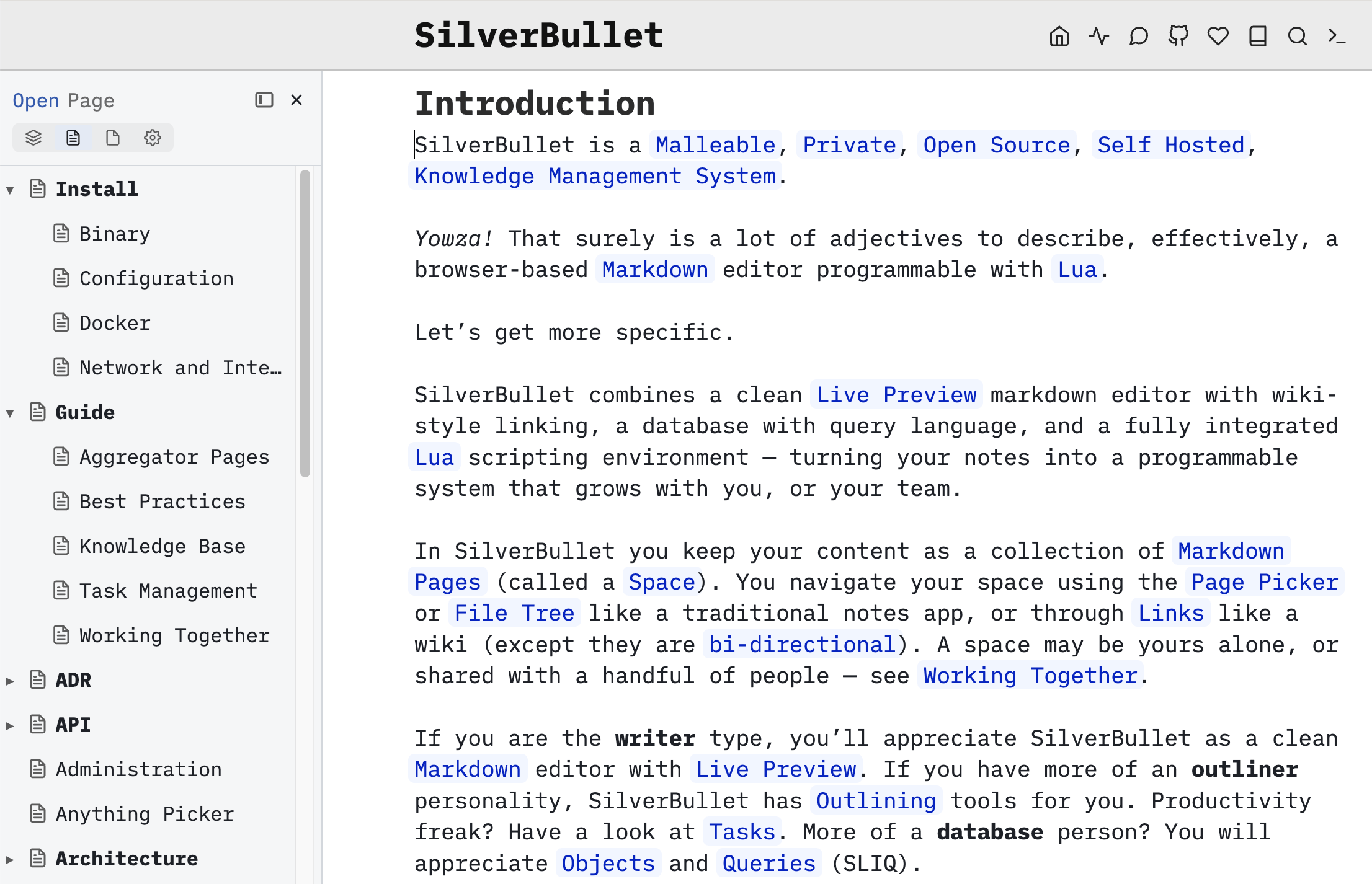 I’m quite happy with it. It operates quite a lot like the page picker: it can be operated with the keyboard, and filters down the results by simply typing.
Also, you’ll notice the little dock icon there at the top. This allows you to (persistently) move this view to various locations:
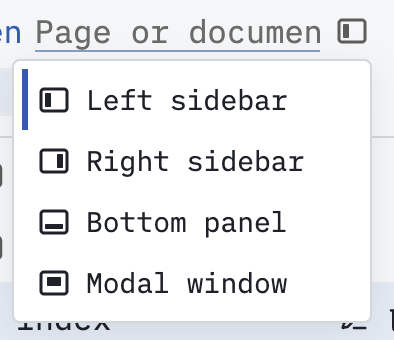 Once opened, it defaults to the left sidebar. However, you can move it to the right, but you can also switch it to “modal” mode, which basically turns it into a page picker in a tree shape:
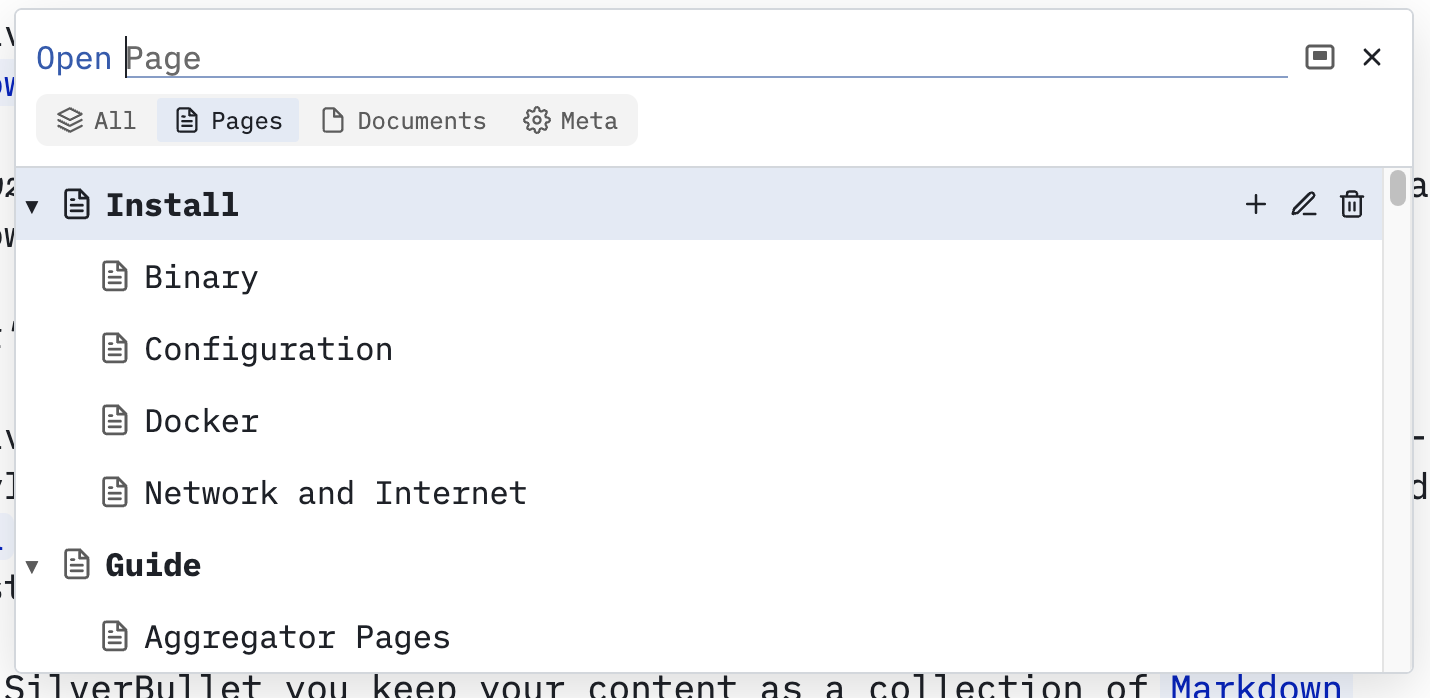 This decision persists between sessions.
Then I thought “hey, that’s a cool UX idea.” So now practically all views can do this. This means you can e.g. dock your page picker persistently to the left, your Table of Contents to the right etc. You can also resize these now.
Also notice the segmented controls in the file tree, which also appear in the page picker:
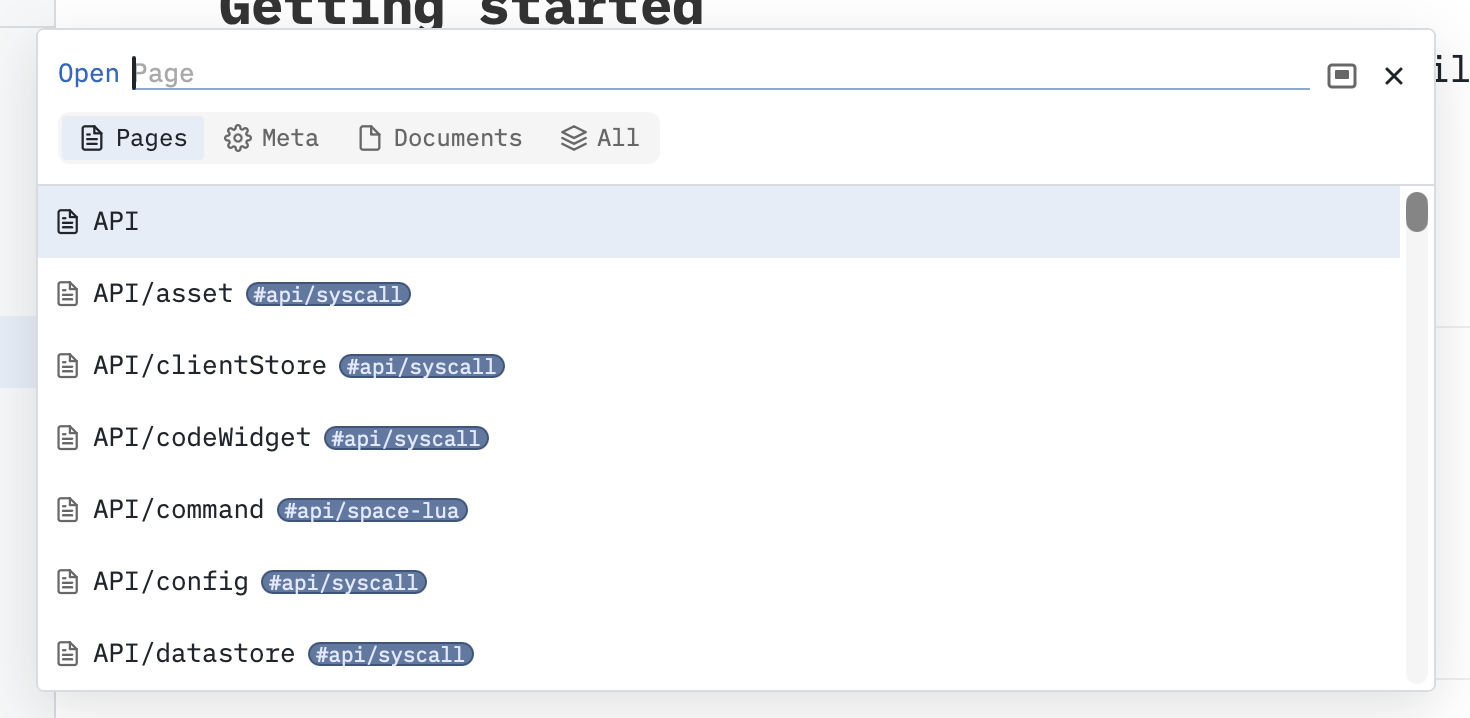 These buttons swap “modes” between all pages, meta pages, documents and all, respectively, you can cycle through them by hitting Tab.
But, I didn’t stop there. Many other features are now rebuilt as such “views” too, including the Table of Contents, Linked Mentions, and Linked Tasks (and more new ones that we’ll get to):
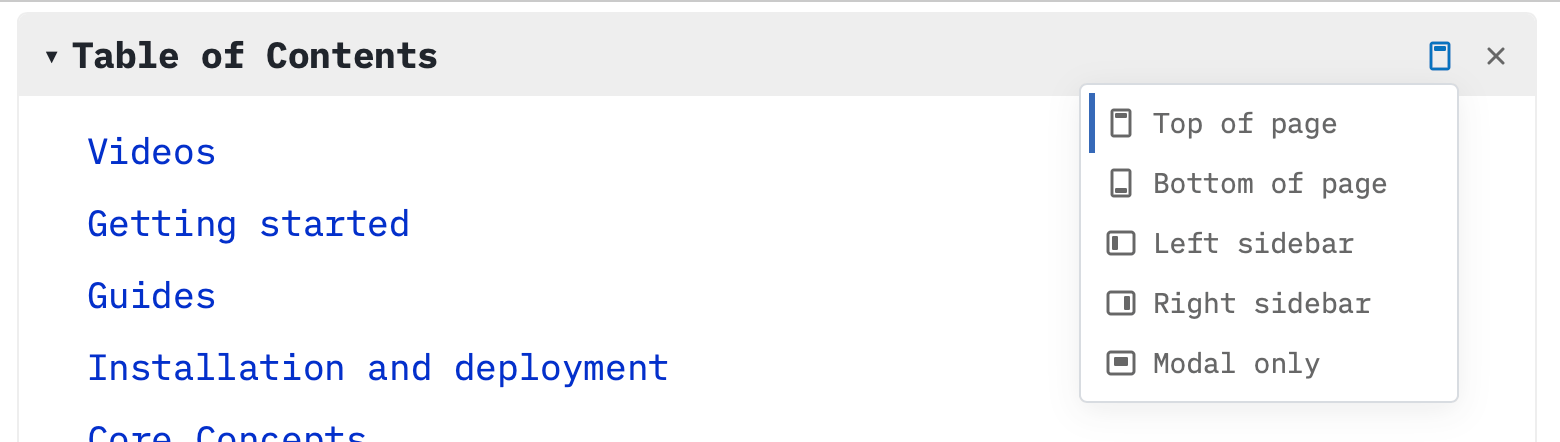 Notice that the TOC you can also dock to the top of the page (and bottom, if you’re a crazy person).
To discover all such views, use the command palette to filter on Navigate: most views will be listed there.
SilverBullet being SilverBullet means that this is programmable, and you can build your own views like this with just a few lines of code. I’m not 100% happy with this API though (nor its docs), so let’s consider this experimental for now.
Obsidian-compatible page links
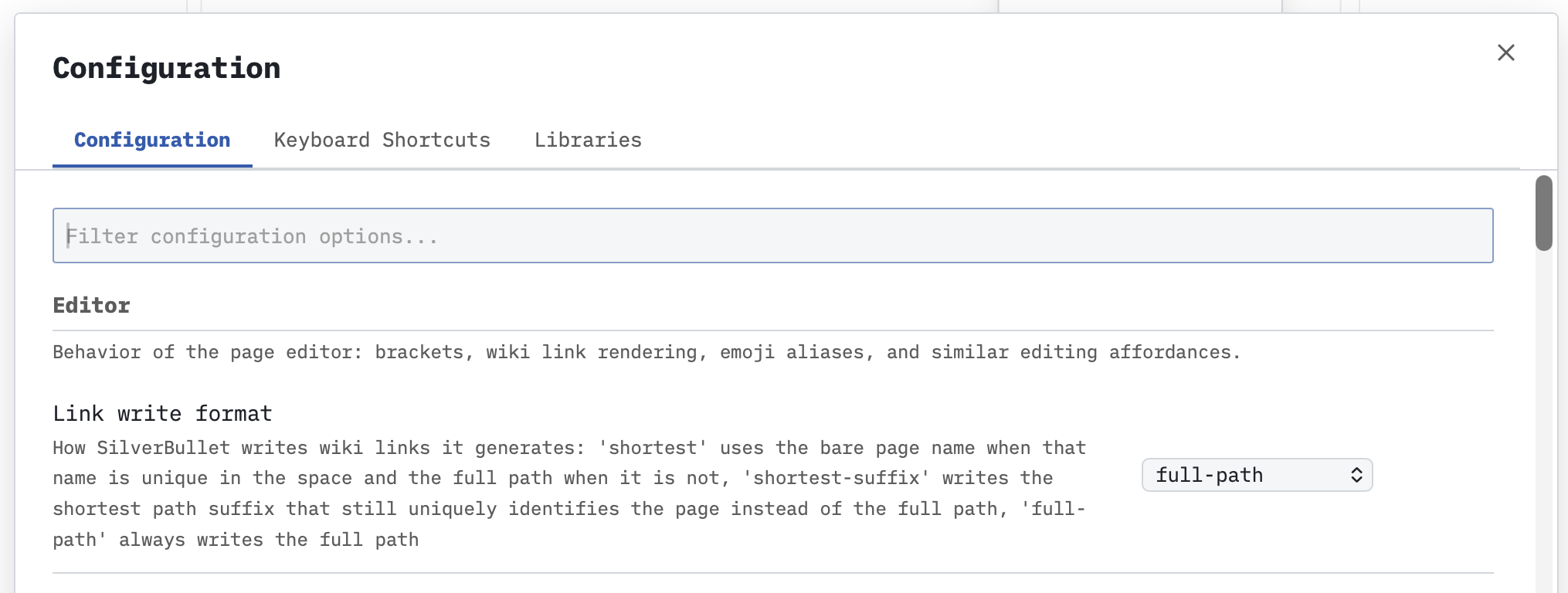
Up to this point SilverBullet had a strict “absolute link” policy. If you created a link [[Hank]], the assumption was you meant there was a Hank page at the root of your space. Obsidian (you may have heard of this tool) used a different policy: if there’s any page with Hank.md as a file name anywhere in your “vault”: fine by us! This was very liberal, and allows for short links most of the time. SilverBullet now also supports this. If you link to [[Hank]] but only a [[People/Hank]] we’ll allow it. By default we’re still going to auto complete full path links, but this is now also configurable. This should make migration from Obsidian easier, and collaboration with people of the Obsidian persuasion easier until they see the light.
Expanding the Multi Space Universe (MSU)
2.10 introduced multi-space as well as multi-user support. A lot of people got excited (including yours truly), and obviously asked for more.
So, 2.11 iterates on the feature, specifically, adding:
- Per user, per space access control:
- Read: read-only access
- Write: write access (and we threw in read access for free)
- Runtime API: ability to use the Runtime API
- You can also make the entire space publicly readable, for the “publicly readable, authenticated editable” use case that some people would like to have.
- Single Sign-On (SSO, OIDC) support
- A profile menu that allows you to see who you are, to log out, edit your profile (we’ll get to this) and return to your space list.
So that’s cool. I think.
Towards a (more) collaborative future
But what’s the point of multiple users if you can’t really collaborate with them? Amirite?
This is an often recurring topic, with a super long back story that long-term SilverBullet users may remember: I’ve had multiple attempts at tackling this problem, all of them have failed thus far.
The end state (as of the last release) was as follows: this is not a tool for collaboration. If two users (or you, on two devices) make changes to the same page and they conflict — tough cookies, you’ll end up with a conflicting copy. Not great, but defensible when positioned as purely for the single-user use case.
At various times in the last years I took a whack at the complete opposite side of the spectrum, rebuilding things on top of CRDTs. Basically this is how Google Docs works: you can see other people edits live, their cursors, selections etc. I got that to work. Ish. But there were so many edge cases that I couldn’t fix leading to data loss in specific cases that I ultimately reverted the whole thing.
Today it’s 2026 and a few things have changed. Notably, there’s SilverBullet+ now, which packages SilverBullet in a neat desktop app. This opens up a lot more use cases, some local, some not.
Second — whether we’re excited about it or not, most people in the software industry cannot get around having a new “collaborator” in town: the (sometimes coding) “AI” agent. Coding agents are very skilled and comfortable with markdown. Specifically, they read and edit markdown files on disk with all kinds of fancy sed and grep wizardry. And, as it turns out, SilverBullet is actually a really neat experience to read/edit/collaborate on such files with coding agents. However, as I said, coding agents edit files on disk. They are hard to persuade to join a “CRDT real-time collaboration session.” And obviously, it’s not just AI coding agents. Many tools are optimized to edit files on disk directly.
From very early on I’ve tried to adhere to a core principle:
The truth is in the markdown: all your content should be represented as plain files on disk and be compatible with using other “standard” tools as much as possible. While additional indexes and databases for efficiency are ok, they should merely be seen as cache that can be wiped at any time. This is important from a lock-in perspective, but also enables using tools outside SilverBullet to edit and operate on these files.
2.11 is my attempt of adding more collaborative features with this constraint.
Quasi real-time updates
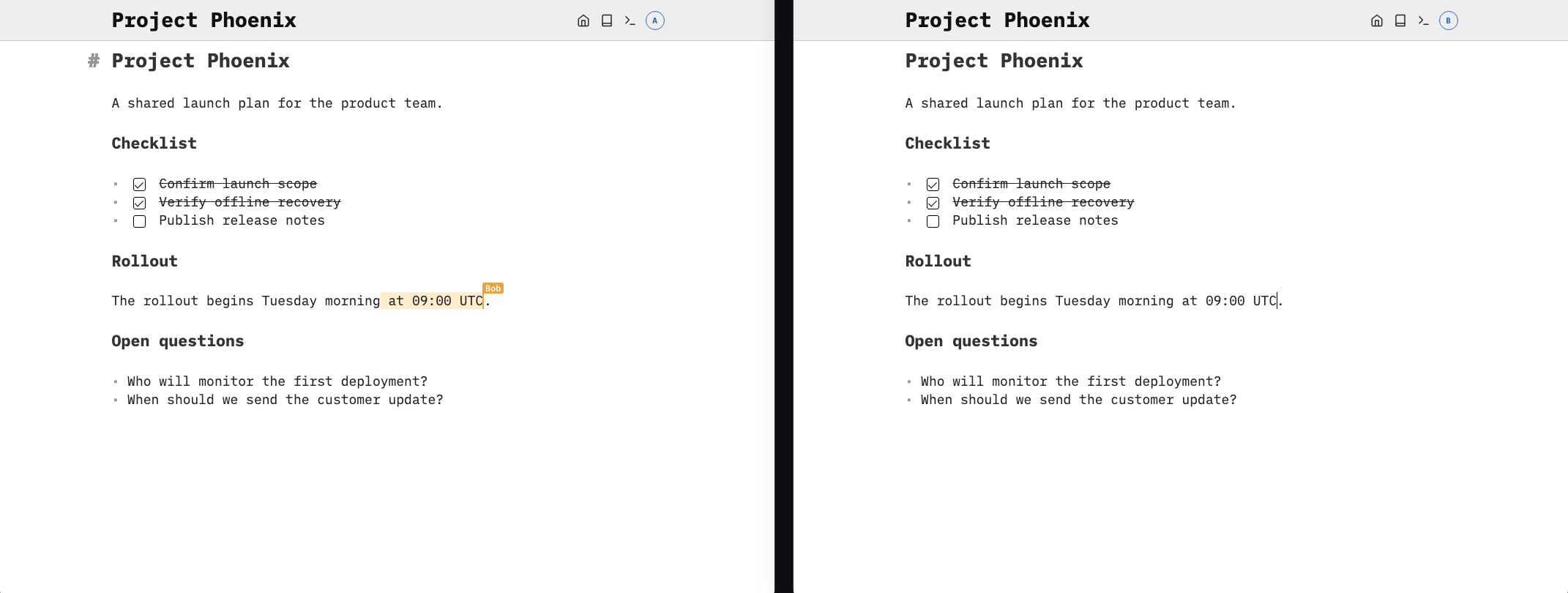
SilverBullet actively monitors files being changed on disk (through whatever means), and then attempt to reconcile those changes in the editor, without killing the editing experience. In the rare case of unresolvable conflicts (think: two people editing the same word), it will show a widget to resolve it.
And… in my day to day practice thus far, this seems to be working quite well.
When a file changes on disk, those changes are pulled in, three-way-merged and (briefly) visually highlighted in the editor as having changed, even attributed to who made the change (e.g. what other user) if this is known. It’s not exactly Google Docs-style real-time, you cannot see cursors and selections, but it works and is kind of cool looking:
But, obviously, this is not all that we need for effective and safe collaboration. Another thing is some sort of versioning.
Revisions
Adhering to the “we’re just files on disk” principle, there’s an obvious answer of how to do this: we’re simple people, we like simple tools. Like git.
SilverBullet 2.11 has a revision system built on top of git. There were libraries to do something basic before, now it’s built into SilverBullet’s core.
At a per-space level you can choose three modes:
- Off: no revisions
- Unmanaged: SilverBullet just enables revision support (= show you git history), but doesn’t actively commit things on your behalf
- Managed: SilverBullet will actively make commits for you
If you’re like — meh, don’t need that, YOLO! Then leave this feature off.
If you are more of a control freak, or your SilverBullet(+) space is part of a larger git repository (think: docs as code), Unmanaged is for you.
For everybody else: Managed is for you. It’s also the default for new spaces. Don’t think about it, just enable it. It will create you a git repository, regularly make commits, and when the shit hits the fan, use commands like Revision: Page History or Revision: Space History to see what changed, whodunnit, and to revert to previous version right from SilverBullet. You do need git installed, though. It’s part of the docker containers already.
The nice thing: underneath, this is pure git. No SilverBullet-specific stuff here at all. It interoperates perfectly with other tools.
Also, there’s a fairly nice way to configure automatically pushing and pulling this local git repo to e.g. Github, Forgejo, Gitlab or other Git hosting providers that you can configure via the web UI (look for it under the “Revisions” part of your space configuration).
Interacting with others
This is where the more experimental stuff starts: things that I’m less sure about, and will likely change in the future as we see how they’re used in practice (or not).
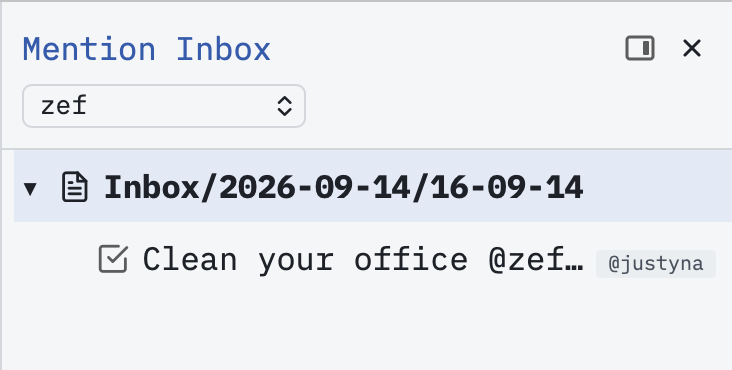
I’ve added support for at mentions. You can at-mention any identity (@steve), but get auto complete for the usernames of users in your space. When you at-mention somebody, they can see it in their “Mention Inbox” (Navigate: Mentions) and quickly jump there. When you click such a mention, it also opens this inbox filtered to that user name.
Now, this could act as a type of inbox for things that are actionable. For instance, you could use it in a task:
* [ ] Clean your office @zef, kthxbye -- @justyna
In this purely hypothetical example, my wife assigns me tasks in a shared space. The -- @mention is a special notation that establishes authorship, because otherwise I wouldn’t know who is telling me this:
 I repeat, this is an experimental idea that I’m not sure is going to work or be sufficiently useful. But it’s something you can try out and see what you think. Of course, you can also mention yourself if it’s just you out there.
Comments
A collaborative use case will likely make you want to leave comments for yourself or others, there should be a way to do that too.
Most tools handle this “out of band” — meaning in some hidden system you don’t have access to. This is not really the SilverBullet way. The truth is in the markdown. So therefore I opted to use a mechanism that’s already support in markdown, the HTML comment:
<!--
Hello, yo!
-->
which in SilverBullet 2.11 Live Previews as follows:
 Clicking that “Resolve” button simply deletes the comment. Inside of the comment, you can use any markdown you like, including the creation of tasks, at mentioning other users. A whole conversation could happen in there. It’s just markdown.
The cool thing about using HTML comments is that when you preview markdown documents with such comments on e.g. Github, those comments will automatically be hidden.
Again, I think this may be a solid building block to support collaboration, but time will tell how it works out when people actually use it.
Here’s a video walkthrough of what’s there in 2.11 right now:
Towards SilverBullet 3.0
There’s a lot of experimental stuff here, especially around multi-player support. This needs to be tested and validated, tweaked and polished (lowercase p). There’s also security constraints to be ironed out and clarified.
However, I think by the time we nail this, it will be time to transition this to become SilverBullet 3.
- SilverBullet 0.x/1: the OG version.
- SilverBullet 2: we removed a lot of stuff and doubled down on Space Lua.
- SilverBullet 3: we can use this for collaboration now.
But not yet. We’ll get there.
Optimizations and fixes
In addition to the headline items mentioned there’s also a whole bunch of performance and other random fixes applied in this release. Specifically sync and indexing performance should have improved quite a bit in this release, and “boot” time of the client as well.
I’ll randomly note that whereas for the last few releases SilverBullet refused to even load over a plain IP without TLS (https), this is now partially supported. You won’t get offline support (because that requires a TLS certificate), but everything else mostly works now. 🤞
SilverBullet+
As usual, SilverBullet+ (the desktop app) is released in tandem with SilverBullet providing all SilverBullet.md’s improvements. This time is no different. In addition:
- When setting up sync with a SilverBullet.md server, there’s now a “browser auth” option (for SilverBullet.md servers running 2.11+) allowing for a much smoother auth experience.
- SilverBullet+ supports revisions for local spaces as well (if git is installed), but automatically switches to the the sync server’s revisions system when sync is set up.
sb CLI
The sb CLI that you can use to talk to remote (SilverBullet.md) servers, or local SB+ spaces via the terminal added a few features as well:
- A
sb fssub-command exposes common file system operations like ls, read, write, edit - When adding a new space, a browser-based auth flow can be used for authentication.
Docker images changes
This release also marks a few changes to the docker image names used. We had a lot of legacy there, and it’s time to clean it up:
Moving forward:
:latest(or not using a tag at all): this is the latest release version (right now 2.11.0) including the runtime API (= Chrome). I think the Runtime API is going to get increasingly valuable down the line, so I want to start defaulting to having the Runtime API available now. However, this does make the image a few hundred megabyte bigger. If you don’t like this, you can use the “slim” versions.:latest-slim: same, but without the runtime API (much smaller).:edge: follows the latestmainbranch commits — for those who want to live on the bleeding edge. Includes the runtime API.:edge-slim: same as edge, but without the runtime API.:x.x.x: a specific pinned release with the runtime API:x.x.x-slim: same as above but without the release.
For a while I’ll keep pushing to :v2 as well for legacy reasons, but if you were using :v2 (edge builds) before it’s better to simply switch to :edge now.
Second, the mounted data folder has changed from /space to /data. There is a fallback in place, so for now /space will keep working, but it’s recommended that (e.g. as part of your migration to a multi-space instance, see below) you update your volume mapping to /data instead of /space when you can.
Upgrade notes
As SilverBullet’s feature set is expanding and the amount of knobs and configurations grows with it, something’s gotta give. A lot of configuration options (like revision configuration, git sync, OIDC support) are therefore only available in multi-space mode.
Therefore I’ll start to slowly deprecate the “single space” mode that you get when you run SilverBullet with various (legacy) environment variables set. Likely, with the coming of a 3.0 release, single-space legacy mode will be dropped entirely.
What I recommend you do at your convenience if you’re still using a “single space” deployment of SilverBullet:
- Spin up a fresh SilverBullet instance next to your existing one, pointing
/data(the new “main” mounting point) at a fresh folder. - Run through the setup flow via the web UI once the new container runs, noting where the space will be stored physically (e.g.
spaces/notes). - Move (or to be safer: copy) all your space files from your old SB instance into this
spaces/notes(or whatever) folder mounted into the new container. - Open the space via the new instance to make sure everything is there.
- Profit.
Support SilverBullet development
Last year I made the decision to reduce my regular day job to fewer days to create more time to work on SilverBullet. This allows for deeper focus and more ambitious work. And as you can tell it’s paying off! We have more monospace font now! If you like this direction, and would like to support it, there are multiple ways to make this more financially palatable for me:
A big ❤️ to all already supporting this way — it’s much appreciated! And as you can tell from the progress, we’re moving full steam ahead with the additional time that I can now spend!
Full(ish) changelog
- Significant visual refresh:
- Doubling down on the monospace fonts. This is a more “techy” tool and it seems fitting..
- More consistent UX across and control the increasingly large UI surface (mostly the Dashboard UI).
- There are probably still issues, this will need some time
- Significant multi-space server upgrade and revamp:
- Profile menu giving access to profile editing, list of all spaces, login, logout
- Hostname and path-prefix bindings can now be composed, so one custom hostname can serve multiple non-overlapping spaces such as
/workand/wiki, with shared setup, creation, and settings controls. - Read/Write/Runtime API permissions per user
- SSO user creation asks for email before suggesting a username.
- Public space support (no auth)
- Admin tab:
- Single Sign-On (Google Workspace Auth, Pocket ID, other OIDC provider support) support
- Configurable Server name (used in headers)
- Runtime management showing space/user, CPU, memory, and profile disk usage, with Stop and Reset controls.
- Breaking: shell commands are now off unless a space explicitly enables them.
- Significant steps towards a more Collaborative Future:
- Near real-time sync: changes made to pages are now synced (and will appear in other clients) within ~2-3s.
- Near real-time content updates: if multiple clients/process edit the same page, SilverBullet will do its best to reconcile those changes with local ones. In cases of unresolvable conflicts a new conflict widget will show helping you to resolve the conflict.
- At-mentions and Identities (At-Mention, Identity): mention people, teams, or anything else with
@name. Each name resolves to an Identity — an account, something registered withidentity.define, or simply a name you’ve mentioned — addressed by the@<name:lower>id, so@Adaand@adaconverge on the same identity.identity.own()returns the identity the current user is. An identity is addressed as a Recipient (→ Mention Inbox) or credited as an author (see Authorship). (Note: upgrading triggers a full space reindex, since mention identifiers moved to the@nameform.)- Authorship: a trailing
-- @name(also— @name/– @name) signs a block instead of addressing it, crediting who wrote it without putting them in anyone’s Mention Inbox.authors:frontmatter does the page-level equivalent ofrecipients:. Sign the current block with theMention: Signcommand or the/signslash command.
- Authorship: a trailing
- HTML comments are now parsed as markdown (Markdown/Comment): the body of a
<!-- ... -->block is now parsed and rendered as ordinary markdown. This enables a communication channel (likely using recipients) to communicate between team members. - Revisions: In three modes: Managed (SilverBullet commits your changes for you), Unmanaged (an existing git repository’s history is read, but SilverBullet never commits to it) or Disabled.
- Accounts now carry a full name and email, used to attribute revision commits and shown as the presence label for concurrent edits.
- Every user gets a Profile page to set their own full name and email.
- The editor learns who the space’s people are from a new
/.accountsendpoint, which replaces/.profile: it reports every account with access to the space, with the current user marked, and never an email address. - The
revisions.authorEmailDomainconfig option is gone: synthesized commit author emails now always use thesilverbullet.localdomain. (The old implementation depended on the Runtime API and silently fell back to the default anyway when that was unavailable.)
- Completely revamped Views and dockable panel UX (includes a file tree!): one configurable navigation UI that presents any object collection as a fuzzy-filterable list or tree, either as a modal or as a sidebar. A lot of views have been rebuilt on this.
- Unified docking: every navigator view now has a single, consistent notion of where it lives:
"modal","lhs"/"rhs"sidebar,"bhs"resizable bottom panel, or"page-top"/"page-bottom"(rendered as an in-document widget). You can move all of them, and those docking positions and panel sizes persist between reloads. - The Table of Contents, Linked Mentions, Linked Tasks are now movable, dockable widgets rather than fixed page decorations.
- Markdown-content views:
view.definedefines a view that renders a markdown document instead of a list of rows, through the very same pipeline. - New page decorations for the tree:
icongives a page its own (Feather) icon wherever the navigator draws one,tree.priorityfloats a page above its siblings in the otherwise alphabetical space tree (a priority reorders one level only — pin a folder through the folder’s own page), andtree.hidekeeps a page out of the tree alone.hidenow also hides a page from the tree, not just from the page picker and completions.
- Unified docking: every navigator view now has a single, consistent notion of where it lives:
- Docker images:
- Default images (
:latest,:edgenow default to have the runtime API enabled, and are larger due to including a Chromium build, use the new:latest-slimand:edge-slimimages for the version without Chromium)
- Default images (
- Wiki links now resolve by page name, not just by full path (think: Obsidian compatibility). A
[[Note]]link resolves tosome/folder/Notewhen that name is unique in the space, matching how Obsidian resolves links, so an Obsidian-authored space works in SilverBullet without rewriting every link. See ADR/011 Link Resolution by Name for reasoning. ThelinkWriteFormatoption decides how SilverBullet writes the links it generates (auto complete, rename backlink rewriting), it defaults tofull-path, so generated links keep spelling out the whole path. - LAN HTTP support: open SilverBullet via a LAN IP or hostname without TLS in online-only mode, with compatible hashing and text copying. See TLS for limitations.
- Fix: a linked-mention snippet that contained a
![[transclusion]]inlined the entire target page into the Linked Mentions widget – frontmatter first, rendered as garbage. Snippets now show such a mention as a plain link, and a transcluded page’s frontmatter no longer leaks into rendered widget content. (Triggers a full space reindex on upgrade.) - Fix: better blockquote rendering:
- Nested blockquotes now draw one accent bar per level, with real per-level indentation. Previously every level shared a single bar and the indent was an accident of the whitespace left behind by hidden quote markers.
- A heading inside a blockquote or a list item no longer jumps sideways when you put the cursor in it: its
#markers hang back into the margin the way a top-level heading’s always have, instead of shoving the whole line right. - A quoted heading’s accent bar now runs the full height of its line, instead of stopping short of the heading’s breathing room at both ends and breaking the bar into dashes.
- Multi-space mode: an account menu in the editor’s top bar.
- Fix: the first-run setup wizard and the Dashboard are usable on a phone.
- A batch of mobile (iOS) fixes:
- Pickers no longer show keyboard shortcuts on touch devices, where they cannot be pressed and only crowd out the page names.
- Filter boxes no longer autocapitalize or autocorrect: command and page names are identifiers, and the phone’s corrections only fought the fuzzy match.
- Fix: the hamburger menu on a narrow screen stayed grey when the rest of the top bar turned yellow to signal a lost connection.
- Fix: on iOS 27, a home-screen install drew its page title and top-bar buttons underneath the system’s new blurred top edge, leaving them smeared. The top bar now leaves that band clear.
- Space Lua: scripts that runs too long no longer freeze the editor: after a couple of seconds it offers to stop the script, while the rest of the app stays responsive.
- Fix: releasing a drag-selection on top of a link no longer navigates to it — only a real click (pointer down and up in the same spot) follows a link.
- Fix: a markdown table whose column happens to be named
ref,tag,tags,itags,pageortablerefno longer overwrites the indexed row’s own identity. - Fix: the Runtime API’s headless Chrome crashed and restarted every few seconds on the
-runtime-apidocker image, spamming the server log (and the host’s console with core dumps) and leaving the API only intermittently available. - Fix: the server-side rendered HTML of a public, read-only space now resolves
[[wiki links]]the same way the client does (space-wide by basename), instead of emitting the raw link text as the href. Crawlers and no-JS visitors get working links. - Fix:
.heiffiles are now served asimage/heif(their registered type) instead ofimage/heic - Fix: a
.gitignorefile in the space root was applied as a SilverBullet ignore list - Fix: the docker image ignored
PUID/PGIDand space folder ownership, running asrootand creating root-owned files - Fix: the FreeBSD server binary is being built and released again
- Fix: multi-space mode silently ignored
SB_REMEMBER_ME_HOURS,SB_LOCKOUT_TIME, andSB_LOCKOUT_LIMIT, hardcoding “remember me” sessions to 7 days and lockout to 10 attempts per minute. All three now apply there too — server-wide, like the session itself — matching what Install/Configuration documents. - The Runtime API now uses a separate Chrome process and temporary profile for each user and space, isolating cookies, browser storage, and logs. Runtime requests carry the user’s identity; revoking access stops the affected browser. Chrome detection is reported at startup.
- Fix: the Runtime API failed to start when authentication was enabled.
- CLI remote file operations:
sb fslists, reads, creates, edits, and deletes space files without the Runtime API. Exact text replacements support batches and revision checks to detect concurrent changes. - Removed the experimental
sb replcommand and its dedicated runtime support. Usesb lua,sb lua-script, andsb logsfor terminal access. - Fixes around casing in page/file names:
- Renaming a page or folder to a different casing of the same name now works on case-insensitive filesystems (macOS, Windows)
- Renames are now rejected when the new name differs only in casing from an existing page or document, so spaces stay portable between case-sensitive and case-insensitive hosts.
- On case-insensitive filesystems, writing a file whose folder differs only in casing from an existing one now re-cases that folder to match — so writing
notes/foowhen the disk holdsNotes/renames the folder, changing the reported path of every page inside it.
Subscribe to No SilverBullet
Get new posts by email. No spam, unsubscribe anytime.
Prefer a feed? Grab the RSS feed.