Docs as Code
I’ll be honest with you, I’ve never been a huge Confluence, Notion nor Google Docs fan. Leaving aside that all these products recently seem to have pivoted to AI in a hardcore manner, there’s a few things that just feel off:
- They keep my data in a proprietary format on the vendor’s cloud (unless you self host, e.g. with Confluence). While all these tools have an export function to various formats, none are trivially portable and always “lossy.” There’s lock in.
- They’re WYSIWYG editors and I just don’t like my markup hidden. I like knowing what’s happening underneath. No surprises.
- For engineering use cases, it doesn’t sync up with the code base. It’s either ahead (describes features that have not been implemented yet), or — more realistically — wildly out of date. In many companies, sadly, the de-facto state is that Confluence is where information goes to die. And ironically for a search company, that Google Docs is where information gets lost.
Can we do better?
Enter the Docs as Code movement:
Documentation as Code (Docs as Code) refers to a philosophy that you should be writing documentation with the same tools as code:
- Issue Trackers
- Version Control (Git)
- Plain Text Markup (Markdown, reStructuredText, Asciidoc)
- Code Reviews
- Automated Tests
This means following the same workflows as development teams, and being integrated in the product team. It enables a culture where writers and developers both feel ownership of documentation, and work together to make it as good as possible.
Put simply, rather than have a separate documentation system somewhere out there in the clouds, we simply create a docs/ folder in our repo and track things there.
Documentation is written in markdown (let’s pretend those other mentioned formats don’t exist). Changes to the docs are going to be made part of the same commit (or branch, or pull request) as where the functionality is added, so the docs are always in sync with the code (if update those docs, obviously).
And, as it turns out, our new-found friends are significantly more eager to edit and wade through enormous amounts of of markdown files than editing some external system they’re not familiar with (a comfort zone thing), so this is a nice bonus.
Slam dunk. No?
Dunkin’ on the slam
Well… not entirely.
You see, Confluence and Notion power-users will quickly raise their hand and tell you that these products offer nice features that are there by default in the “docs as code approach,” such as:
- Collaborative features (real-time, collaborative editing, comments)
- Easily accessible to less tech-y-folks, because: web app
- Fancy diagrams
- Fancy dynamic views (filtered lists, database-style features in Notion)
True that.
A docs as code approach means that your collaboration approach changes from inline commenting and real-time collaboration to the Git style format of branching, issuing PRs, commenting on those etc. For some workflows that’s not ideal, but also what makes it consistent with the rest of the software development process. So in a sense the same model for review is now applied for both code and docs.
Should product and engineering collaborate on ideas this way? It really depends on the company and its culture (a git savvy’ness of PMs), but likely there’s a more pragmatic approach to be found here, where e.g. brainstorming and initial specs are collaboratively edited in Google Docs, but ultimate outcomes find their way back into your repo.
Exposing these docs to an audience that’s less git clone savvy? This is a problem easily solved with some tools that turn your docs folder into a nice looking documentation site, like MkDocs, or docmd, or markdoc, or hugo, or… you get the point. You now have options. And depending on what you’re documenting, you could now publish (a subset) of this to the public.
That leaves fancy diagrams and dynamic views that are not supported by core markdown, really. Depending on your “flavor,” you may get de-facto support for e.g. mermaid diagrams (Github supports it out of the box), but this is definitely not on par with Confluence and Notion. True.
But hang on… isn’t there a tool that has support for this type of thing? Something named silver, something. SilverRocket? No… that wasn’t it.
Enter the bullet train
Enter SilverBullet, and especially suitable for this use case: SilverBullet+. Yeah, who would have guessed things were heading this way, huh?
Point SilverBullet+ at your docs folder, and you’ll get a great markdown editing experience with live preview out of the box. It looks and feels remarkably like a WYSIWYG editor, but it’s not. It’s real markdown you’re editing, and not apologetic about it.
If you install the right set of libraries, you get mermaid support with live preview also, so you can build your pretty diagrams in a versioned textual format with reasonable git diffs. Like Linus intended.
You can even go really crazy, and build your documentation as a docker container packaged with SilverBullet, and publish it that way. This is how silverbullet.md works.
Just gettin’ started
But… oh boy, there’s more.
Let me preview a couple of things that are already on SilverBullet edge builds (and on the SB+ Pro edge release channel), and will be part of the 2.10 release.
The best way to explain these, is this is to show them in action in SilverBullet’s very own docs folder (yes, I’ve dogfooding docs as code since… forever, without realizing it).
Here is the new ADR page:
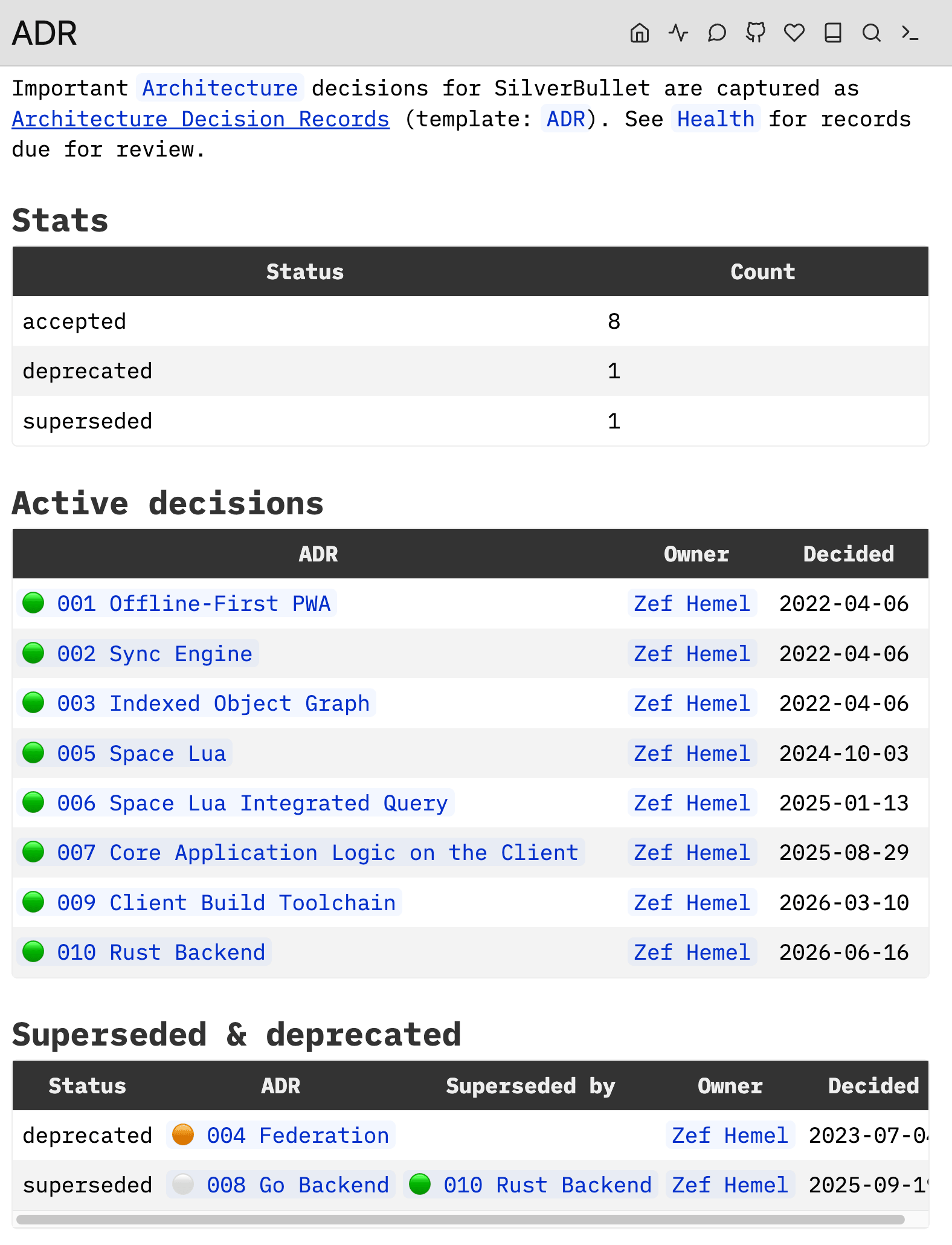
If you’re a little familiar with SilverBullet’s capabilities, this will click: right, of course, you can build views like this with queries! And why not do this for my project’s docs too?
All you need to do is annotate your pages with some semantic frontmatter, nothing higly controversial:
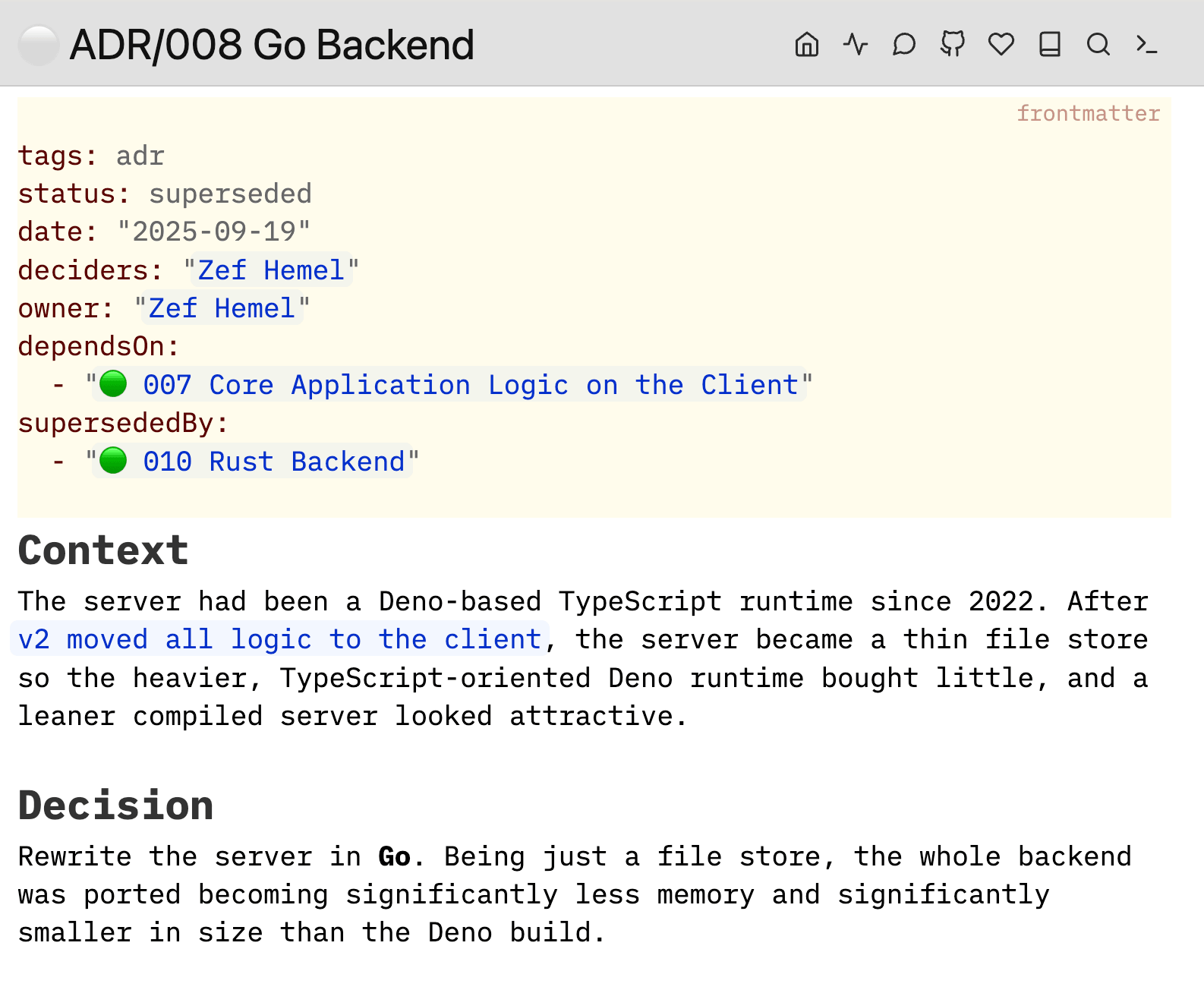 There is nothing SilverBullet-proprietary going on annotating your pages this way.
Case in point, this is what it looks like if I would (hypothetically) open this page in Obsidian, just for shits and giggles:
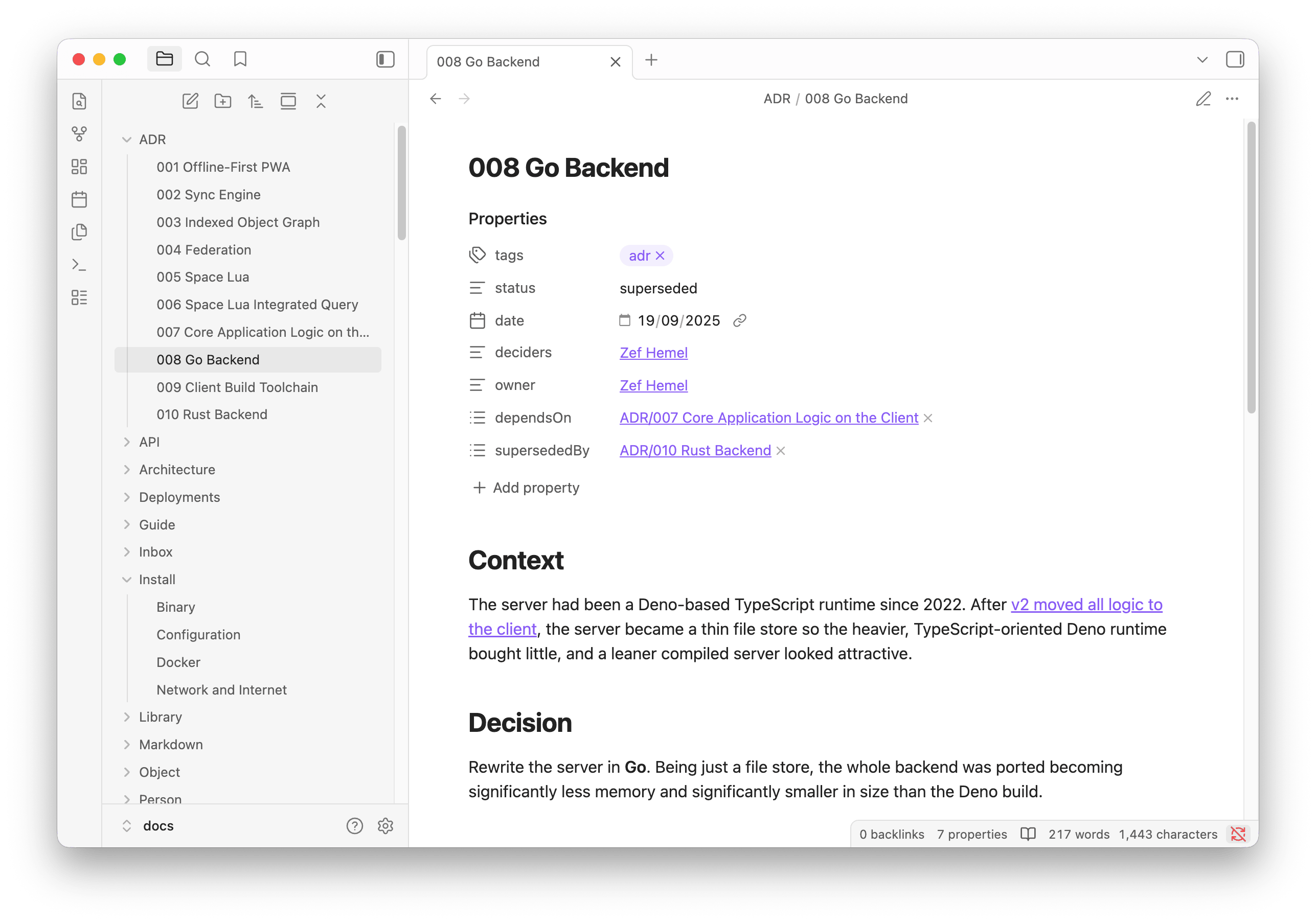 Just as in SilverBullet, I can navigate the links and relationships here by simply clicking. There’s no deep lock-in in making this annotation effort.
Where there is some level of “lock in” is once you start to leverage SilverBullet’s queries. But honestly, you could rebuild these lists using Obsidian’s Bases as well.
Pushing on
But again, I buried the lede slightly. Let’s scroll down the ADR page a bit more:
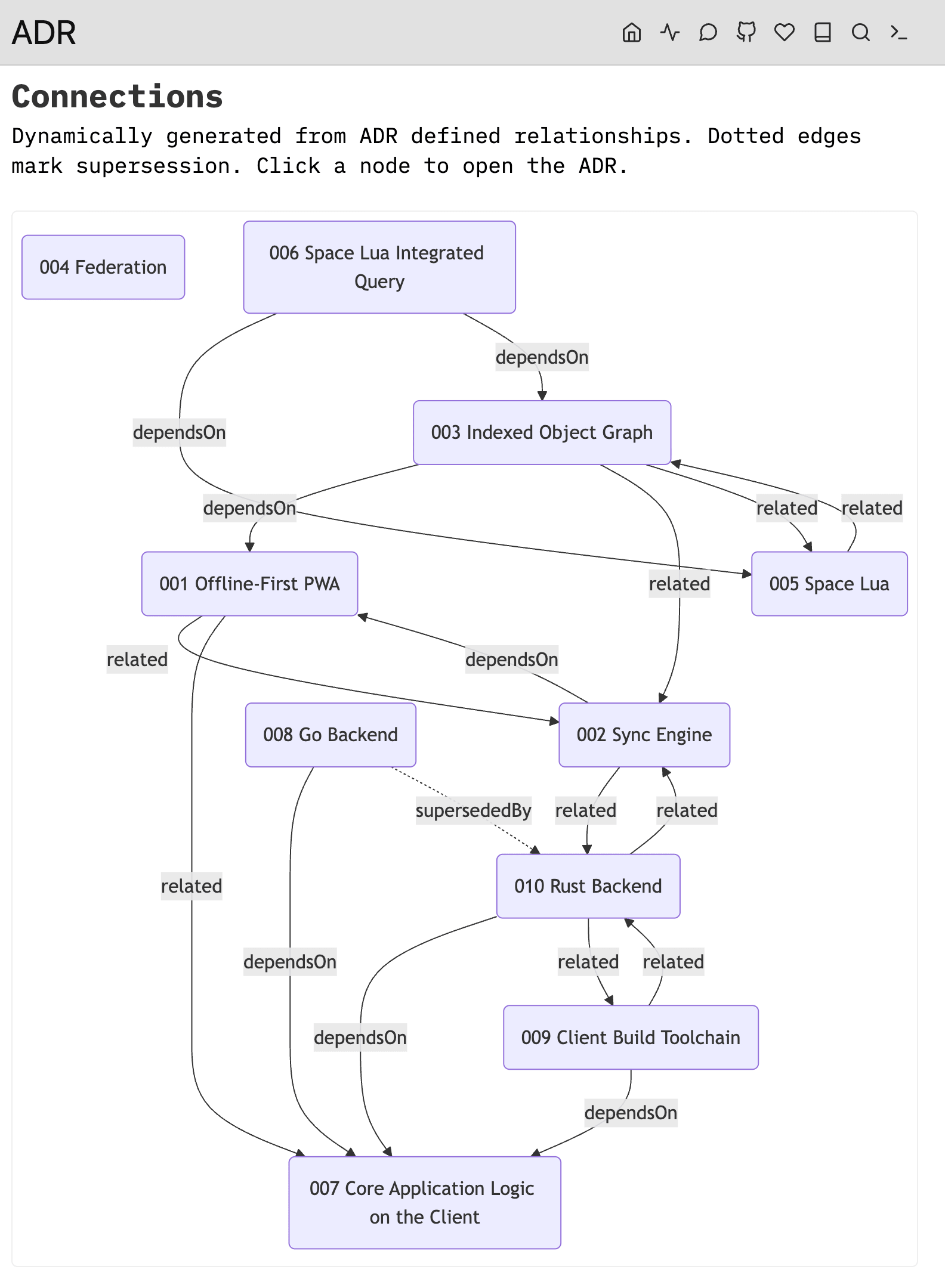 Nice one Zef, did you hand-roll a mermaid diagram there?
Hah! Right, sure that sounds like me. No, I’m too lazy. I try to offload this type of stuff to more capable tools like Space Lua. This is the Lua expression being Live Preview’ed on the previous screenshot:
${mermaid.diagram(mermaid.relationGraph {
  pages = query[[from index.pages("adr")]],
  direction = "TD",
})}
Yeah, that’s it.
This leverages the new silverbullet-diagram library I’m working on that will succeed the previous mermaid plug soon. In addition to the static mermaid diagram rendering in fenced code blocks (like what Github supports), it has the ability to, based on SilverBullet’s Object Index, dynamically build up a graph of inter connections, then serializes this into the mermaid syntax and hands it off to the mermaid engine to render.
 Isn’t that beautiful? The fundamentals have been accumulating over the four years of SilverBullet’s history and now this stuff comes to fruition. I wish I could claim that this was all part of the plan, but it wasn’t. Sometimes things just happen. That’s life. Now it’s all about getting leverage out of them. #lifelesson
There are more types of Mermaid diagrams.
Let’s scroll down that ADR page a bit more:
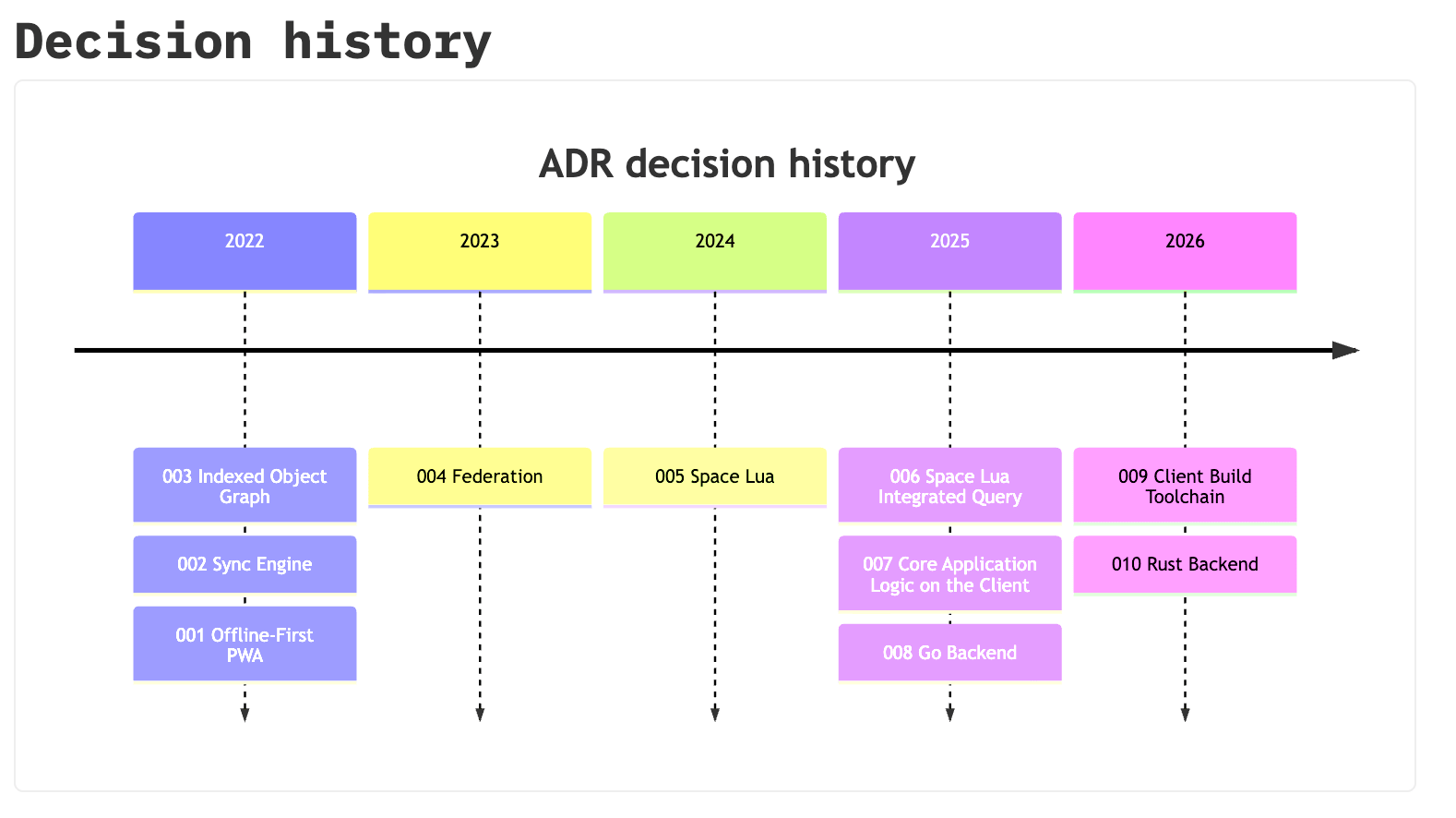 The code:
${mermaid.diagram(mermaid.timeline {
  pages = query[[from index.pages("adr")]],
  title = "ADR decision history"
})}
Did I mention that the entirety of the diagram library was written in Space Lua?
The Architect
But we’re not done yet, let’s move on to the updated Architecture page.
Previous iterations of this page were built using embedded Excalidraw diagrams (also nice), and later with hand-rolled mermaid diagrams, but no more.
We’ve moved beyond this now.
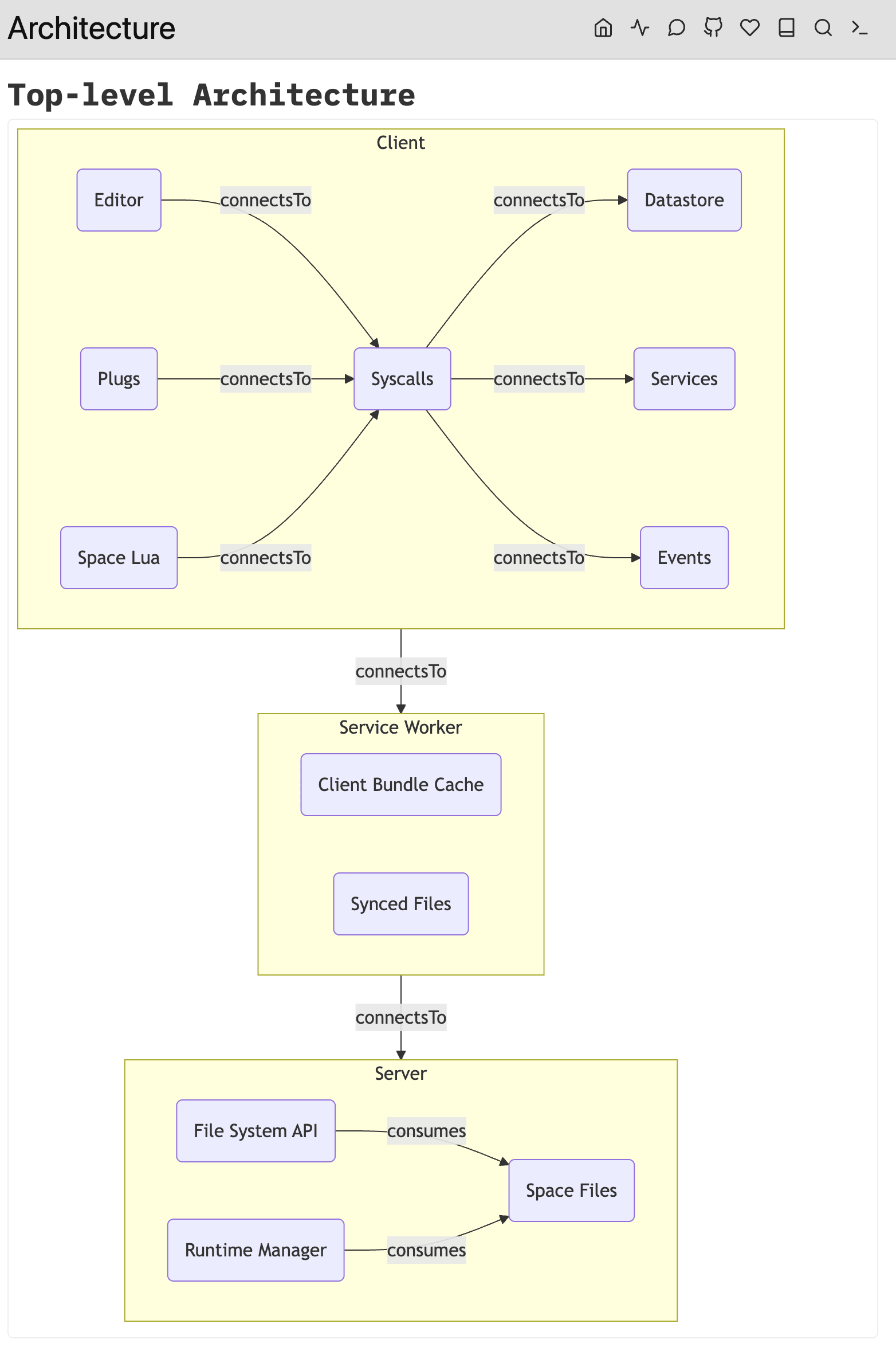 Derived from:
${mermaid.diagram(mermaid.relationGraph{
  pages = query[[from index.pages("component")]],
  relations = {"connectsTo", "consumes"},
  groupBy = "partOf",
  direction = "TB"
})}
Because, yes I’ve improved my architecture documentation, I refactored it into smaller pages and added a few links:
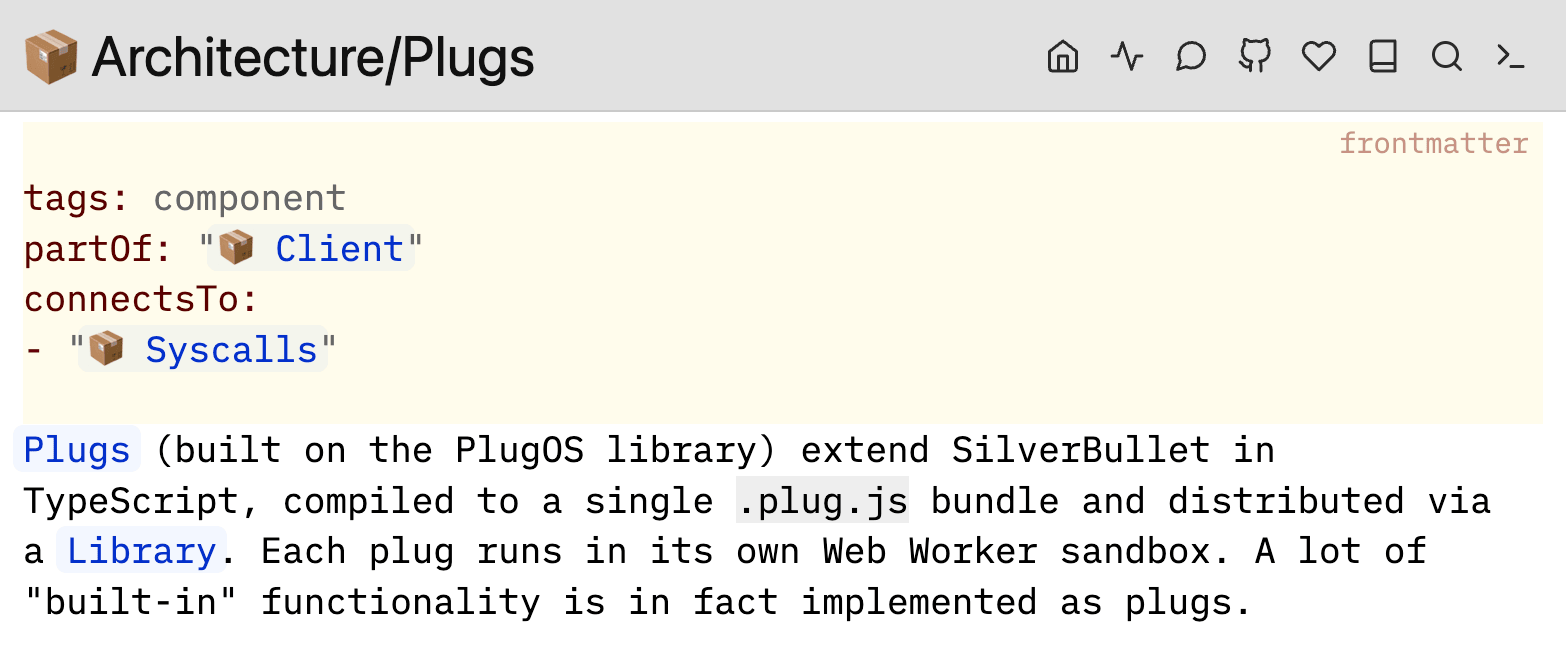 And what I get is an always up to date architecture diagram that updates whenever I make changes to the individual page components, or add new ones.
You know, as I make changes to my code repo’s docs, as I develop those features.
Docs as code.
If you liked it you should’ve put a lock on it
“Hey, dude. But you started this out complaining about lock-in and proprietary formats. Isn’t this just the same?”
Fair call out.
Are we not replacing Notion and Confluence lock-in and proprietary formats with SilverBullet specific ones? I mean, cooler ones, and more open ones (since SilverBullet is open source), but still, if you use this heavily you’re locking yourself in, no?
Yes. Ish.
First of all, as I pointed out with my Obsidian screenshot (my retroactive apologies for that one), your primary investment should be in properly documenting your system. And then adding some links.
Those links are not SilverBullet specific. They’re technically not markdown either, but with at least Obsidian following the same format (not an accident), and with many markdown tools somehow supporting wiki links, you’re only “locking yourself in” to the degree that these markdown extensions are not international and officially ISO certified standards. It’s still a simple text format that you or your mechanical buddy will happily sed or script into some other format if push comes to shove.
Then, on the ${...} funny business — yes, when used like that, those overview pages (like the ADR and Architecture ones I showed) you can only use with SilverBullet or SilverBullet+ as an editor. Note that this makes this crazy let’s ship our docs as a SilverBullet-based container slightly less crazy.
However, there’s a “compromise feature” that I’m dabbling with for the next 2.10 release for this also: Baked Sections (again, already on Edge). Perhaps not the final name yet, but hear me out.
Getting baked
Long time users of SilverBullet, specifically of versions of v1 that had not yet introduced Lua, will be familiar with this idea:
Hide your query (an expression that derives the overview table, the diagram etc.) between two HTML comments, so that it will be hidden by most markdown tools, and have the body be “on command” updated to the current rendering of that expression.
In its most basic (and pointless) form, you can now write this in SilverBullet markdown:
<!--#lua 10 + 2 -->

<!--/lua-->
Then, when I run the new Baked Sections: Update command (Cmd-Shift-b/Ctrl-Shift-b), it will instantly expand into:
<!--#lua 10 + 2 -->
12
<!--/lua-->
You get the idea, the <!-- ... --> bits will be hidden in “foreign views” like Github preview and the output of your MkDocs or other publishing tool, just the body will appear.
Here’s something more interesting:
<!--#lua query[[
  from p = index.contentPages()
  order by p.lastModified desc
  select templates.pageItem(p)
  limit 2
]] -->
* [[Docs As Code]]
* [[Incremental Formalization in Note Taking]]
<!--/lua-->
Again, that body gets replaced with fresh content every time I run the Baked Sections: Update command. I can commit this to git, it can get published, and that’s it.
It also works for those mermaid diagrams:
<!--#lua mermaid.diagram(mermaid.relationGraph {
  pages = query[[from index.pages("adr")]],
  direction = "TD",
}) -->
```mermaid
flowchart TD
  n1("001 Offline-First PWA")
  click n1 call __sbNav("ADR/001 Offline-First PWA")
  n2("002 Sync Engine")
  click n2 call __sbNav("ADR/002 Sync Engine")
  n3("003 Indexed Object Graph")
  click n3 call __sbNav("ADR/003 Indexed Object Graph")
  n4("004 Federation")
  click n4 call __sbNav("ADR/004 Federation")
  n5("005 Space Lua")
  click n5 call __sbNav("ADR/005 Space Lua")
  n6("006 Space Lua Integrated Query")
  click n6 call __sbNav("ADR/006 Space Lua Integrated Query")
  n7("007 Core Application Logic on the Client")
  click n7 call __sbNav("ADR/007 Core Application Logic on the Client")
  n8("008 Go Backend")
  click n8 call __sbNav("ADR/008 Go Backend")
  n9("009 Client Build Toolchain")
  click n9 call __sbNav("ADR/009 Client Build Toolchain")
  n10("010 Rust Backend")
  click n10 call __sbNav("ADR/010 Rust Backend")
  n1 -->|"related"| n2
  n1 -->|"related"| n7
  n2 -->|"dependsOn"| n1
  n2 -->|"related"| n10
  n3 -->|"dependsOn"| n1
  n3 -->|"related"| n2
  n3 -->|"related"| n5
  n5 -->|"related"| n3
  n6 -->|"dependsOn"| n5
  n6 -->|"dependsOn"| n3
  n8 -->|"dependsOn"| n7
  n8 -.->|"supersededBy"| n10
  n9 -->|"dependsOn"| n7
  n9 -->|"related"| n10
  n10 -->|"dependsOn"| n7
  n10 -->|"related"| n9
  n10 -->|"related"| n2
```
<!--/lua-->
Yeah, some stuff breaks because in SB these components are clickable and navigate, but the diagram itself renders. And yes, it results in a lot of git churn with a diff every time these “bodies” change, but as I said: it’s a compromise for those who don’t want to go all in (yet).
What now?
As you can probably tell, I’m quite excited about this approach and I’m eager to do more with this SilverBullet use case. Even if you don’t think you need a ridiculously powerful and scriptable notes app, you definitely do need a great docs editor.
The funny thing is that this use case has been there, in my face, all along: from the very first version, the SilverBullet website has been a SilverBullet instance pointed at the docs (actually website) folder in the repo. Partially as a cool demo, and partially because I’m just not great at building nice looking websites.
However, I never considered this was potentially killer app for SilverBullet. Another surprised unlocked by SilverBullet+, because it makes running and managing multiple spaces so much easier.
So if you didn’t feel you had a need for SilverBullet, although you were kinda intrigued — no more excuses, head for that Download page.
The Plan
So, here’s the plan. And it’s a plan for you. I’ve done my part.
If you’re in a software team and are unhappy with the likes of Confluence and Notion. Create that docs folder in your repo and start populating it with excellent handcrafted (or less handcrafted) markdown content. Pure markdown content. Maybe with a link. Maybe with some frontmatter. Nothing controversial.
The, you’ll be like, “hey team we now have docs in our repo, let me just setup a CI pipeline to publish this internally ok?”
As you screenshare your demo, a colleague notices your dock. “What’s that beautiful blue star icon there?”
“Oh that, that’s SilverBullet. Funny you should ask about it, and speaking about those docs. Let me show you what we can do if we start to truly leverage SilverBullet as a docs as code tool.”
Promotion guaranteed.
Subscribe to No SilverBullet
Get new posts by email. No spam, unsubscribe anytime.
Prefer a feed? Grab the RSS feed.