SilverBullet 2.9
After well over a decade of not giving talks, I decided I should “get out there” again, to share the SilverBullet gospel. I decided to start out (relatively) small with a talk on a local free software conference called PIWO. The talk was recorded (even live streamed). You can jump to this location in the live stream to watch it. I think a cleaned up version of the video will be posted later. My demo didn’t go exactly flawless (more on this later), but I think overall it was successful. People seemed to like it.
Err, what does any of this have to do with the 2.9 release?
I’ll get there. Patience, grass hopper.
What’s good about such an event is that it forces one (= me) to think about the bigger picture of what SilverBullet is all about, and come up with a somewhat coherent story. Also — and this is where the benefit to you comes in, it is a reason to fix a bunch of visual bugs that will inevitably show up when doing a live demo.
So, in advance of the talk I got to work.
Polish, polish
In preparation of the demo I fixed a ton of visual issues: slightly misaligned text in the UI, and addressing indentation in the editor as well. Here is a stress test page you can check out to see that things now align nicely in more scenarios (within reason). There were also some eratic cursor movement behaviors still around, many of those have been resolved as well.
What is unfortunate is that due to technical issues involving (not) managing to successfully connect my laptop to the projector, I ended up doing something macOS users rarely do: reboot. After my reboot, and firing up my terminal again — by now being well over 5 minutes late to start — I rapidly auto-completed the location of my demo install of SilverBullet to a backup I had made a week earlier. Meaning none of the beautiful polish fixes made it to the actual demo 🤦. Such is life. Nothing a my usual jazz hands distraction strategy couldn’t fix.
Semantic relations
On to more meaty changes.
Any note app will allow you to create multiple notes, often presented in some sort of reverse-chronological order.
Many notes app will enable you to invest an inappropriate amount of time in coming up with The Ultimate Folder Structure™ to bring some sort of order to your chaos of random notes.
Fewer note apps will allow you to create additional layers of structure to your notes without requiring much advance planning. Such mechanisms may include tagging, annotation with meta data (e.g. frontmatter), or linking.
SilverBullet supports all of these things (although somewhat discourages heavy folder structures), its query capabilities have always been strong, but I felt it still under leveraged the linking aspects.
Linking pages is a natural thing to do while taking notes, even simply for the purposes of auto-completing common concepts. However, the amount of meaning attached to such a link has been rather superficial. Sure, Linked Mentions are a useful way to discover what concepts may be related, but isn’t there more we can do?
SilverBullet 2.9 introduces something more generic than a plain “link” by upgrading the concept to a relation. Therefore, relations are the (not just spiritual) successor to links.
Objects often have relationships, and we have multiple (natural and less natural ways) to model them. Traditionally there’s page mentions: in the body of the page you create a (wiki) link to another page: [[other page]]. However, there are other types of relations as well, such as the more implicit co-mentions, where two pages are both mentioned in the context of one paragraph or list item. Likely this means they’re somehow related:
* Spoke to [[Linda]] about [[Project Phoenix]]
Such co-mentions are captured by relations as well.
If you’re more hardcore, you can use links in frontmatter or attributes:
---
manager: "[[John]]"
---
Now you’re effectively adding an even more semantic link to the John page where it’s clear we’re not just talking about some vague “mention” relation, but explicitly about a manager one.
All these types relationships are now indexed as part of relations. A relation is meant to represent any kind of relationship between objects, for now:
- A
mention: page A mentions page B. - A
co-mention: where page A and B are mentioned in the same context (paragraph, list item), suggesting they are somehow related. - An attribute-based mention: this is a mention happening in the context of an attribute value (using the attribute syntax, frontmatter or in a data object), these relations are represented with the attribute name as their kind.
That’s all very nice, but what value do you get out of it?
I may have burried the lede here, slightly.
Object Graph
Enter the new (but experimental) Object Graph that is now bundled with SilverBullet. This is what you’ll see when you fire up the new Graph: Explore command (or hit Cmd-Shift-g/Ctrl-Shift-g) on the Object Graph page (try it):
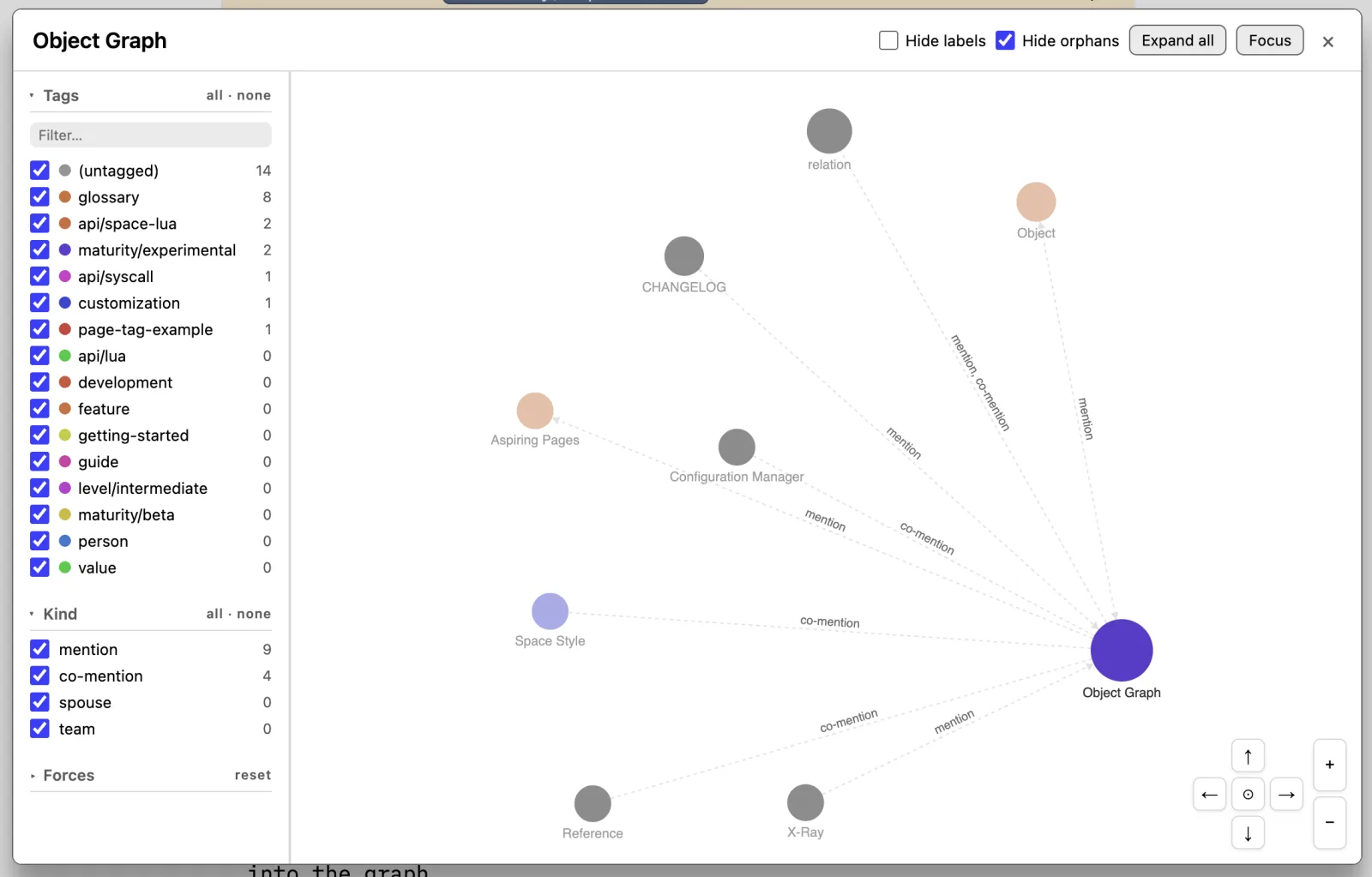 You can activate it in two ways:
 Graph: Explore or Graph: Global Page Map. The first opens up the object graph starting from your current page, just exposing all relations facing outwards from that page. You can click “ghost” nodes to expand the graph further, filter based on tags and relationships from the left side bar. The Global Page Map shows all pages in your space, which may be overwhelming. From there you can filter as you like. There’s an expandable “Forces” section in the side bar as well to play with various configuration options.
The more specifically you annotate your knowledge base, the more (potentially) useful this graph becomes, here’s an example from a more deeply annnotated knowledge graph about Formula 1:
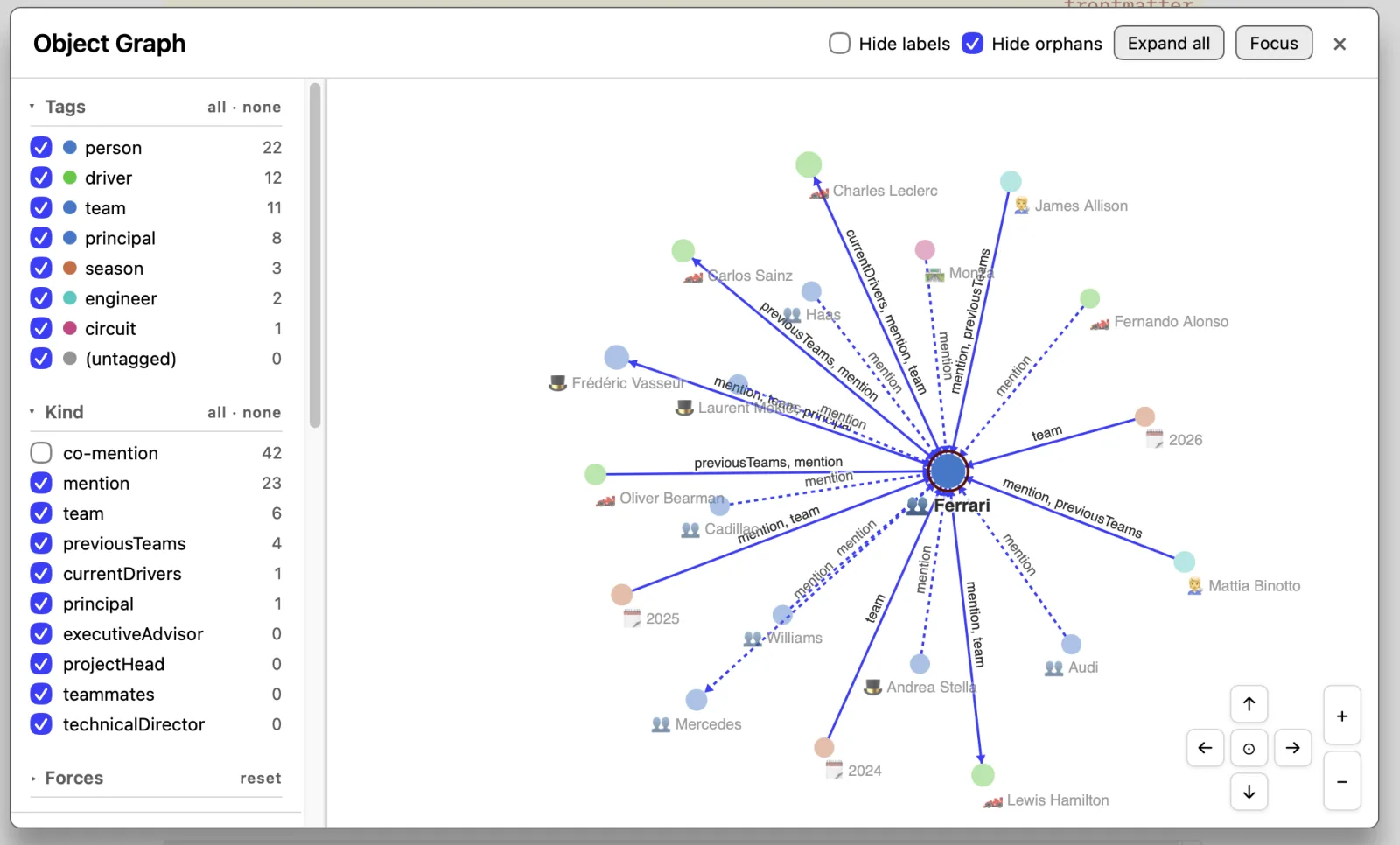 It’s still early days for the Object Graph, but we may have something interesting here. Let me know how it works for you and how we can improve it.
SilverBullet.md changelog
A summary of changes in this release:
- New relation indexed object capturing generalized object-to-object relationships: typed edges from frontmatter, inline
[key: value]attributes, and#tagfenced data blocks; untyped mentions; and co-mention edges between refs co-occurring in the same item, nested item, or paragraph. The (now) legacylinkis reimplemented as a virtual collection on top ofrelationnow and should keep acting as before. - Fuzzy search reimplementation: replaced Fuse.js with a custom scorer that supports multi-token queries, path-aware ranking, and some typo tolerance.
- Start of shared UI components (between SB core and plugs): component styles (for buttons, inputs, selects, checkboxes, tabs, alerts, badges, progress bars), and a
@silverbulletmd/silverbullet/uipackage export providing optional Preact wrappers. See Plugs/Development/Reference for notes on how to use this as a plug author. Built-in plugs like Configuration Manager, and Object Graph are already using it. This now also loads Space Style inside the iframe, so components should become themable. - UX: a lot of little visual tweaks and usability fixes all over the place that hopefully will trigger less of your OCD, including:
- On narrow viewports (<800px) header
#markers no longer get pushed off-screen when the cursor enters a heading - Positioning of the page title is now (more) left-aligned with editor text.
- List/outline alignment: bullets, checkboxes and ordered-list numbers now line up in a clean column regardless of nesting depth, list type, or whether items are tasks.
- Potentially breaking CSS change for theme authors: per-nesting-level indent values previously carried by
.sb-line-ul.sb-line-li-N,.sb-line-ol.sb-line-li-N,.sb-line-taskand.sb-line-blockquote.sb-line-li-Nselectors have been removed.
- Potentially breaking CSS change for theme authors: per-nesting-level indent values previously carried by
- Task checkboxes are now drawn in CSS (
appearance: none+ bordered box + rotated-rectangle checkmark) instead of relying on the native checkboxes. Should improve rendering on webkit browsers. - Clicking a wiki link to a page now places the cursor just after the page’s frontmatter on first visit (matching fresh-load behavior), instead of at position 0. Pages already visited in the session still restore their previously saved cursor position.
- On narrow viewports (<800px) header
- APIs:
- Space Lua: added
spacelua.prettyPrintBlock/spacelua.prettyPrintExpressionto pretty-print a parsed Lua AST back to formatted source. SupportsindentWidth,quoteandtrailingCommaoptions. In preparation of future functionality that will manipulate existing Lua code.
- Space Lua: added
index.contentPagesnow accepts an optionaltagargument to filter content pages by an additional tag, matching the other type-specific API/index helpers.- Fix: forced space reindex handling
- Fix:
$-anchor refs now resolve through the index from every navigation path - Fix: Ctrl/Cmd-clicking a link inside rendered widgets (query/template results) now navigates in a new window via the normal navigation path
- Fix: tag autocomplete no longer triggers while typing markdown header prefixes (
##,###, etc.)
SilverBullet+ changelog
Specific enhancements/fixes to the desktop app:
- Dashboard restyled using SilverBullet’s shared UI components for visual consistency.
- Dashboard: confirm buttons now place Cancel on the left and the affirmative action on the right, matching SilverBullet core dialogs.
- Fix: Cmd/Ctrl-clicking a page link (in the editor or in query/template results) now opens the page in a new native window, instead of doing nothing or navigating the current window in place.
- Fix (Linux): right-clicking a link and selecting “Open Link in New Window” from the context menu now opens a new SilverBullet window for the target page instead of silently doing nothing.
- Linux: the bundled WebKitGTK rendering workarounds (
WEBKIT_DISABLE_DMABUF_RENDERER,WEBKIT_DISABLE_COMPOSITING_MODE) can now be overridden at runtime. Setting both to0re-enables the corresponding GPU use. Try this if you’re experiencing performance issues.
Upgrading
- SilverBullet.md:
- For docker-based install, pull the new image, stop the container and start a new one. For binary-based installs run
silverbullet --upgradeand restart. - Your open tabs should automatically indicate a reload (or two) is required to update to the latest version.
- For docker-based install, pull the new image, stop the container and start a new one. For binary-based installs run
- SilverBullet+:
- You should automatically be notified about an available upgrade, simply click the “Upgrade” button to install it and restart.
- Upgrading should automatically trigger a full space reindex. If this somehow doesn’t happen and certain tags (specifically “link” and “relation”) appear empty, trigger a space reindex manually with the
Space: Reindexcommand.
Support SilverBullet development
Last year I made the decision to reduce my regular day job to fewer days to create more time to work on SilverBullet. This allows for deeper focus and more ambitious work. If you like this direction, and would like to support it, there are multiple ways to make this more financially palatable for me:
A big ❤️ to all already supporting this way — it’s much appreciated!
Subscribe to No SilverBullet
Get new posts by email. No spam, unsubscribe anytime.
Prefer a feed? Grab the RSS feed.